Skip to content

Mobile app

The GrowPython mobile app for sales teams, coming soon

An app for iPhone, iPad and Android to answer replies, approve what the Copilot prepared and see what needs you. It is built and not in the App Store or Google Play yet.

Does the job ofopening five apps to check on one pipeline

What it does

Replies, approvals and Today, between meetings. Coming soon.

  1. Today

    What needs you, in one stack, before you open your email.
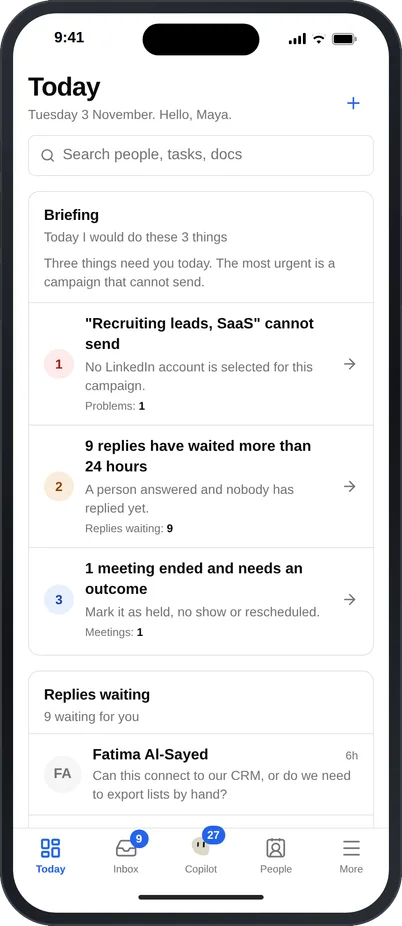
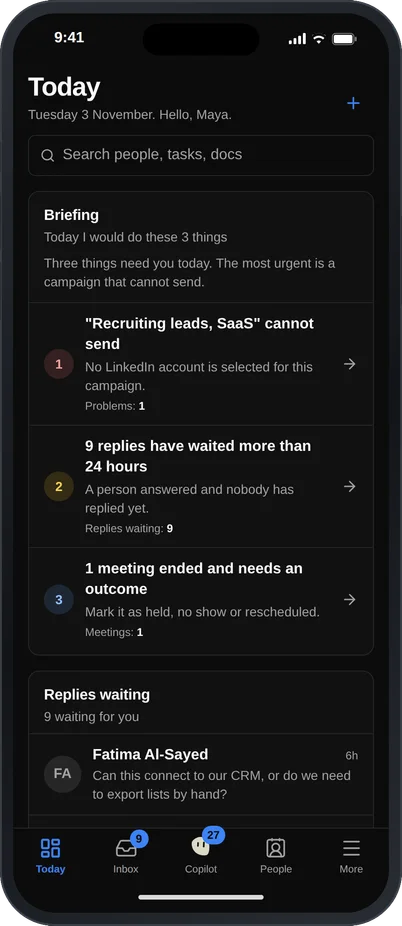
    The Today screen of the GrowPython mobile app on an iPhone: a briefing with three things to do, such as a campaign that cannot send and nine replies that waited more than a day, followed by a Replies waiting list with Fatima Al-Sayed first, and a tab bar with Today, Inbox, Copilot, People and More.The Today screen of the GrowPython mobile app on an iPhone: a briefing with three things to do, such as a campaign that cannot send and nine replies that waited more than a day, followed by a Replies waiting list with Fatima Al-Sayed first, and a tab bar with Today, Inbox, Copilot, People and More. Shown in the dark theme.
  2. Inbox

    Read and answer LinkedIn and email replies, snooze or archive. Sending is a tap on Send, never a swipe.
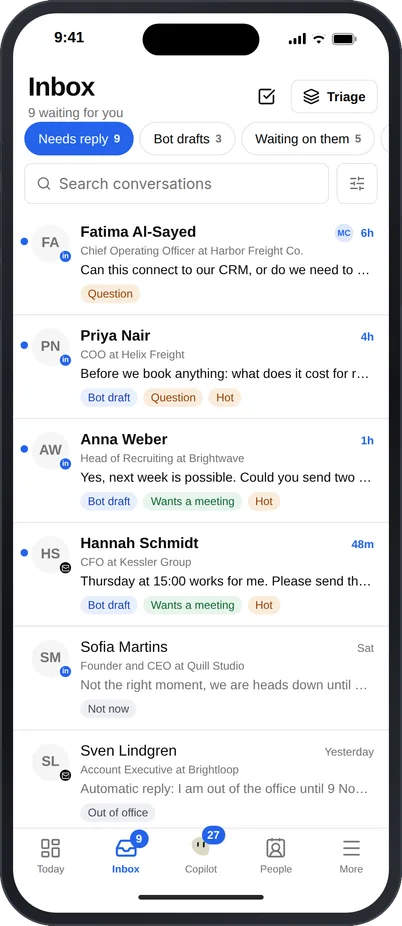
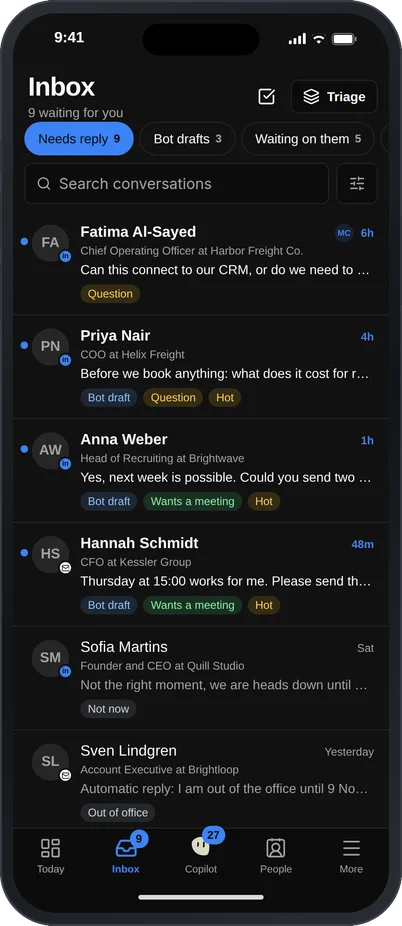
    The Inbox in the GrowPython mobile app on an iPhone with a Needs reply list of LinkedIn and email conversations. Each row shows the person, their company and role, the last message, and labels such as Bot draft, Question, Wants a meeting and Hot.The Inbox in the GrowPython mobile app on an iPhone with a Needs reply list of LinkedIn and email conversations. Each row shows the person, their company and role, the last message, and labels such as Bot draft, Question, Wants a meeting and Hot. Shown in the dark theme.
  3. Copilot

    Ask the Copilot and read its plans and drafts on your phone, with the same rules as on the web.
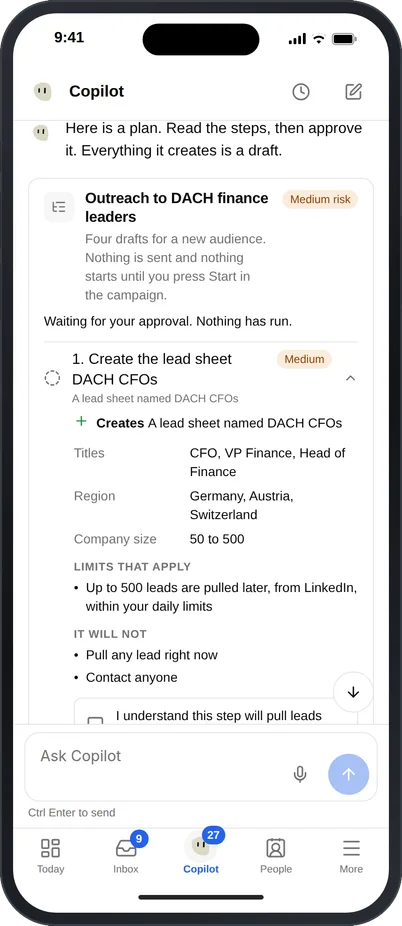
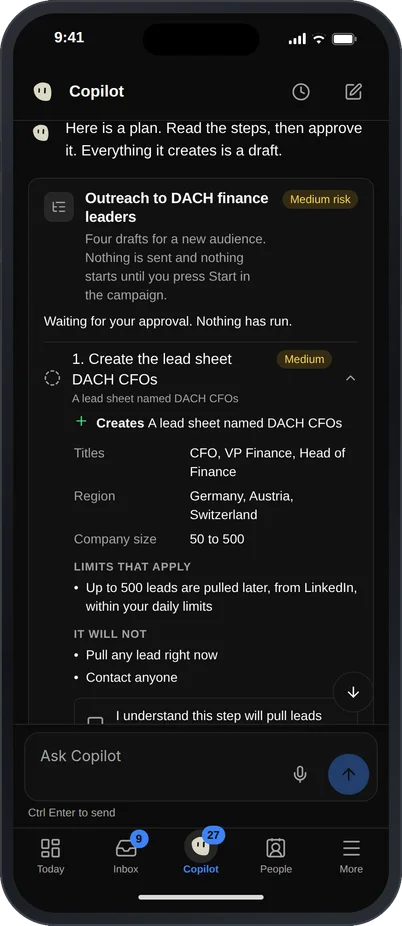
    The Copilot chat in the GrowPython mobile app on an iPhone. After the request to set up outreach for a new audience, the Copilot shows a plan card titled Outreach to DACH finance leaders with a medium risk label, a list of steps and what each one will not do, and Approve and run, Step by step and Cancel plan buttons.The Copilot chat in the GrowPython mobile app on an iPhone. After the request to set up outreach for a new audience, the Copilot shows a plan card titled Outreach to DACH finance leaders with a medium risk label, a list of steps and what each one will not do, and Approve and run, Step by step and Cancel plan buttons. Shown in the dark theme.
  4. Approvals

    Approve or discard what is waiting for you, one deliberate tap at a time.
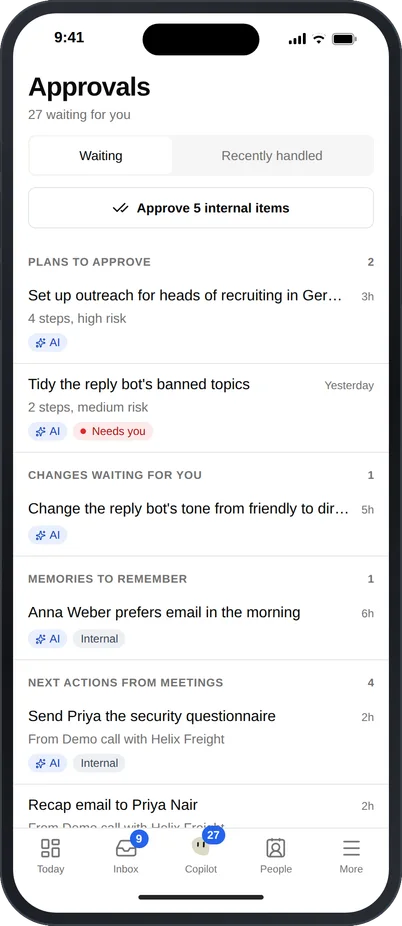
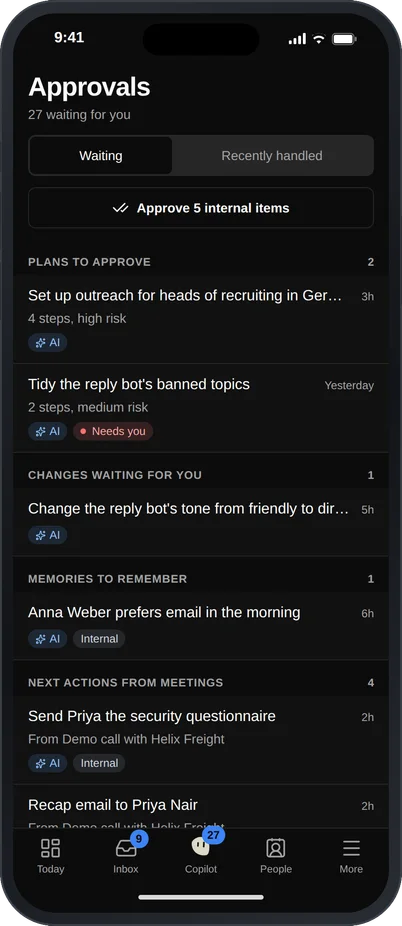
    The Approvals screen of the GrowPython mobile app on an iPhone, listing 27 items waiting: plans to approve, changes waiting, memories to remember and next actions from meetings, each with an AI label, plus a button to approve internal items.The Approvals screen of the GrowPython mobile app on an iPhone, listing 27 items waiting: plans to approve, changes waiting, memories to remember and next actions from meetings, each with an AI label, plus a button to approve internal items. Shown in the dark theme.
  5. Built for tablets too

    On an iPad or an Android tablet the Inbox opens in several panes.
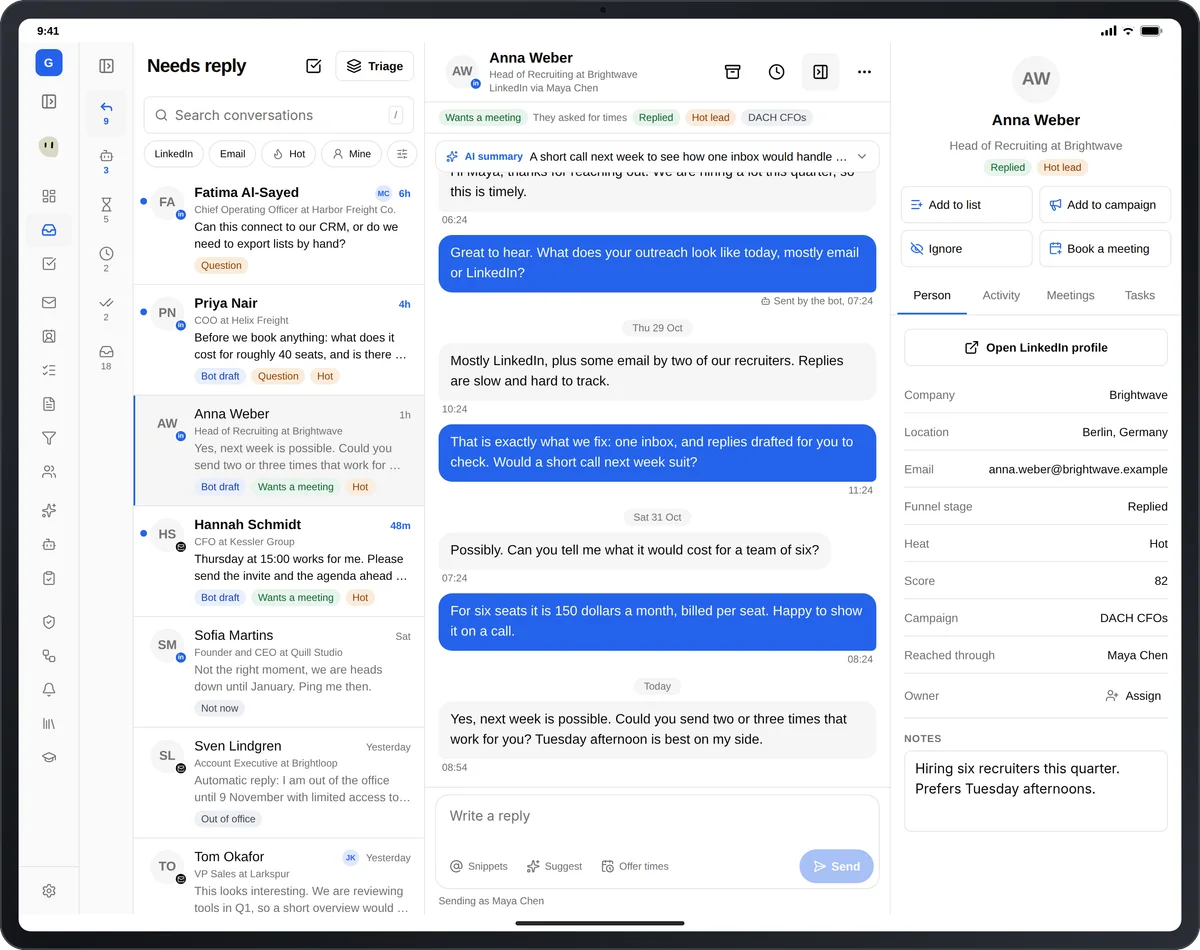
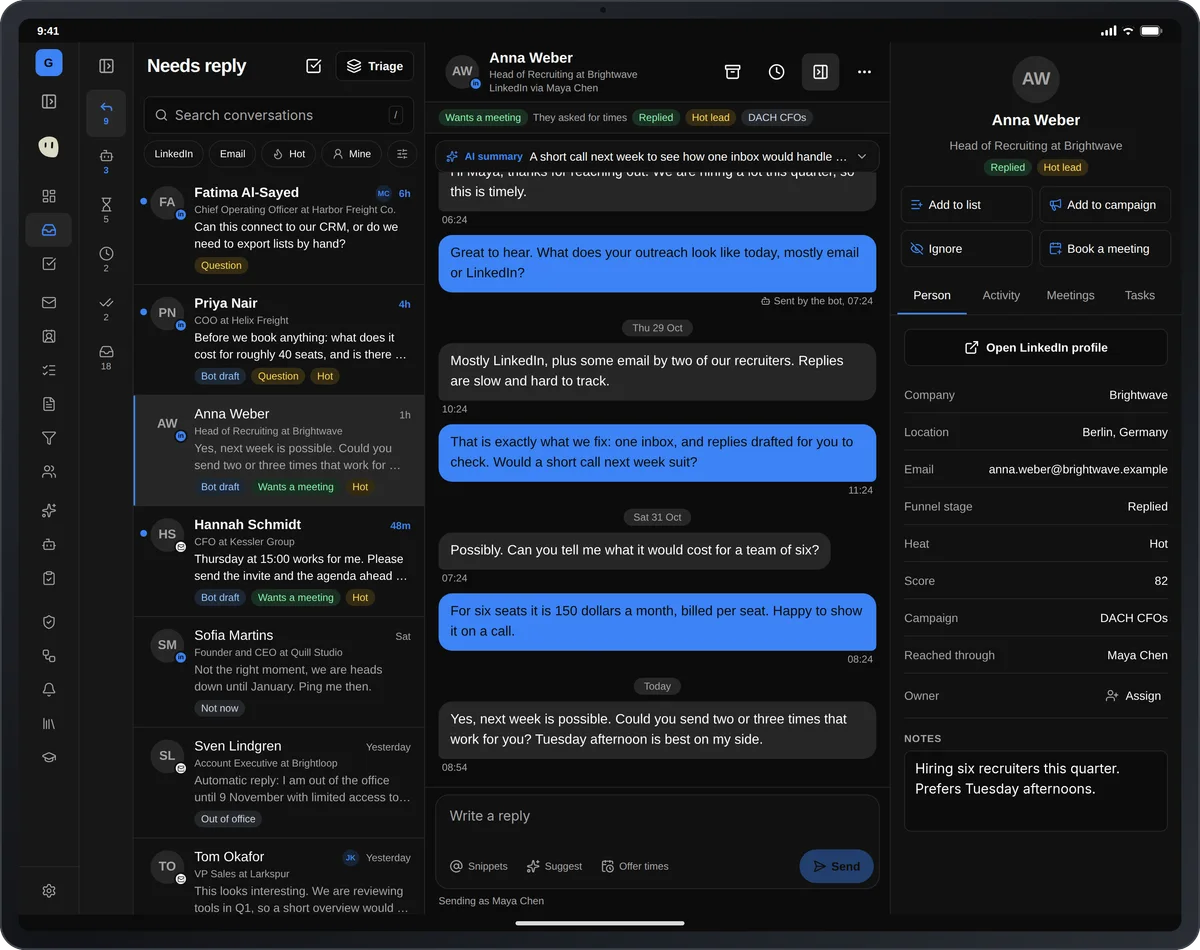
    The Inbox in the GrowPython app on an iPad in landscape with three panes: a folder rail and a Needs reply list on the left, an open conversation with Anna Weber in the middle, and a details pane with the person's facts, activity and tasks on the right.The Inbox in the GrowPython app on an iPad in landscape with three panes: a folder rail and a Needs reply list on the left, an open conversation with Anna Weber in the middle, and a details pane with the person's facts, activity and tasks on the right. Shown in the dark theme.
  6. People, Tasks and Docs

    Look someone up, tick off a task and read a doc.
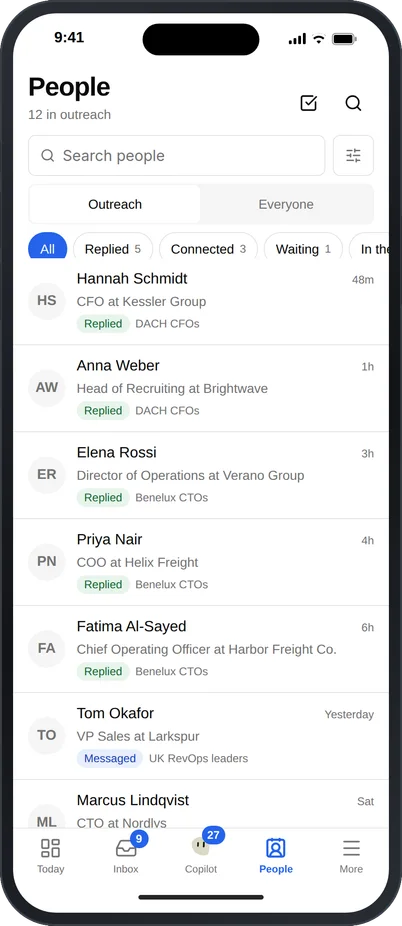
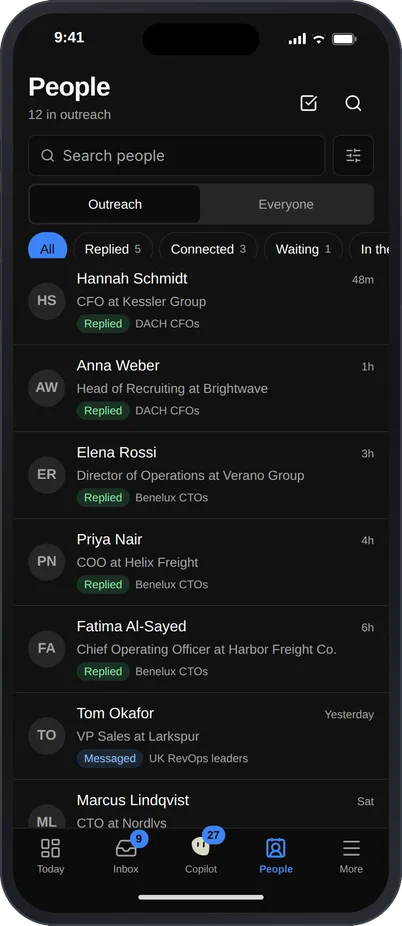
    The People list in the GrowPython mobile app on an iPhone with a search box, Outreach and Everyone tabs, status filters such as Replied and Connected, and rows for Hannah Schmidt at Kessler Group, Anna Weber at Brightwave and Priya Nair at Helix Freight, each with a Replied label and a campaign name.The People list in the GrowPython mobile app on an iPhone with a search box, Outreach and Everyone tabs, status filters such as Replied and Connected, and rows for Hannah Schmidt at Kessler Group, Anna Weber at Brightwave and Priya Nair at Helix Freight, each with a Replied label and a campaign name. Shown in the dark theme.
The Today screen of the GrowPython mobile app on an iPhone: a briefing with three things to do, such as a campaign that cannot send and nine replies that waited more than a day, followed by a Replies waiting list with Fatima Al-Sayed first, and a tab bar with Today, Inbox, Copilot, People and More.The Today screen of the GrowPython mobile app on an iPhone: a briefing with three things to do, such as a campaign that cannot send and nine replies that waited more than a day, followed by a Replies waiting list with Fatima Al-Sayed first, and a tab bar with Today, Inbox, Copilot, People and More. Shown in the dark theme.

How it works

Mobile app

  1. Step 1 of 3

    Start on the web today

    Use GrowPython in the browser now. The mobile app follows once it is in the stores, and you can ask us to tell you when.

  2. Step 2 of 3

    Sign in with your account

    The app uses the same workspace and the same data as the web app.

  3. Step 3 of 3

    Keep the pipeline moving

    Answer, approve and check Today away from your desk.

Limits and guardrails

What it will not do, and what you should know before you rely on it.

  • The mobile app is not in the App Store or Google Play yet. We will say so here when it is.
  • Heavy setup stays on the web: bulk CSV import mapping, white label DNS and billing.
  • Sending, approving or discarding is always a tap. Nothing sends from a swipe, a long press or a notification.
  • Tablets use the same app with a wider layout. There is no separate tablet product.

Mobile app

More screens

  • Today on your phone: what needs you, before you open anything else.

  • The same Copilot plans on your phone. You approve before anything runs.

  • Everything the Copilot prepared, in one list for you to approve.

  • On a tablet the Inbox opens into three panes.

  • Android and iPhone share the same app.

FAQ

Questions

Can I download the app now?

Not yet. It is built but not in the App Store or Google Play. We will say so on this page when it is.

Will it work on iPad and Android?

It is built for iPhone, iPad, and Android phones and tablets, with a layout that follows the size of the window.

Can the app send messages by itself?

No. Sending is a tap on Send. The Copilot only prepares drafts.

Is it the same account as the web app?

Yes. It uses the same workspace and data.

Ready to run client acquisition from one place?

Start your free trial, connect an account and build a small list first.

5-day free trial for new customers