Comparison
Calendly is a scheduling tool. GrowPython has a booking page too, inside the same place where outreach and replies happen. This page sets out what each states about booking.
Published by GrowPython. Facts about Calendly come from its public pricing page, read on 2026-11-03.
Short answer
Which one fits you
you want the booking link to come from the conversation: Offer times in the Inbox adds free times and a link made for that person, next to your LinkedIn and email replies.
scheduling is the whole job: multiple calendar connections, round robin, lead routing, reminders, payments and a long list of integrations.
Side by side
What each tool states
Calendly's column is taken from its public pricing page, read on 3 November 2026 (as of November 2026). A cell that says "not stated" means the page does not mention it, not that the product lacks it.
| Feature | GrowPython | Calendly |
|---|---|---|
| Price | ₹1,500 per seat a month including GST in India, $25 per seat a month elsewhere. A seat is one connected LinkedIn account | Free; Standard $10 per seat a month and Teams $16 per seat a month, both billed yearly; Enterprise from $15k a year |
| Main job | Finding people, outreach on LinkedIn and email, replies and booking in one platform | Scheduling |
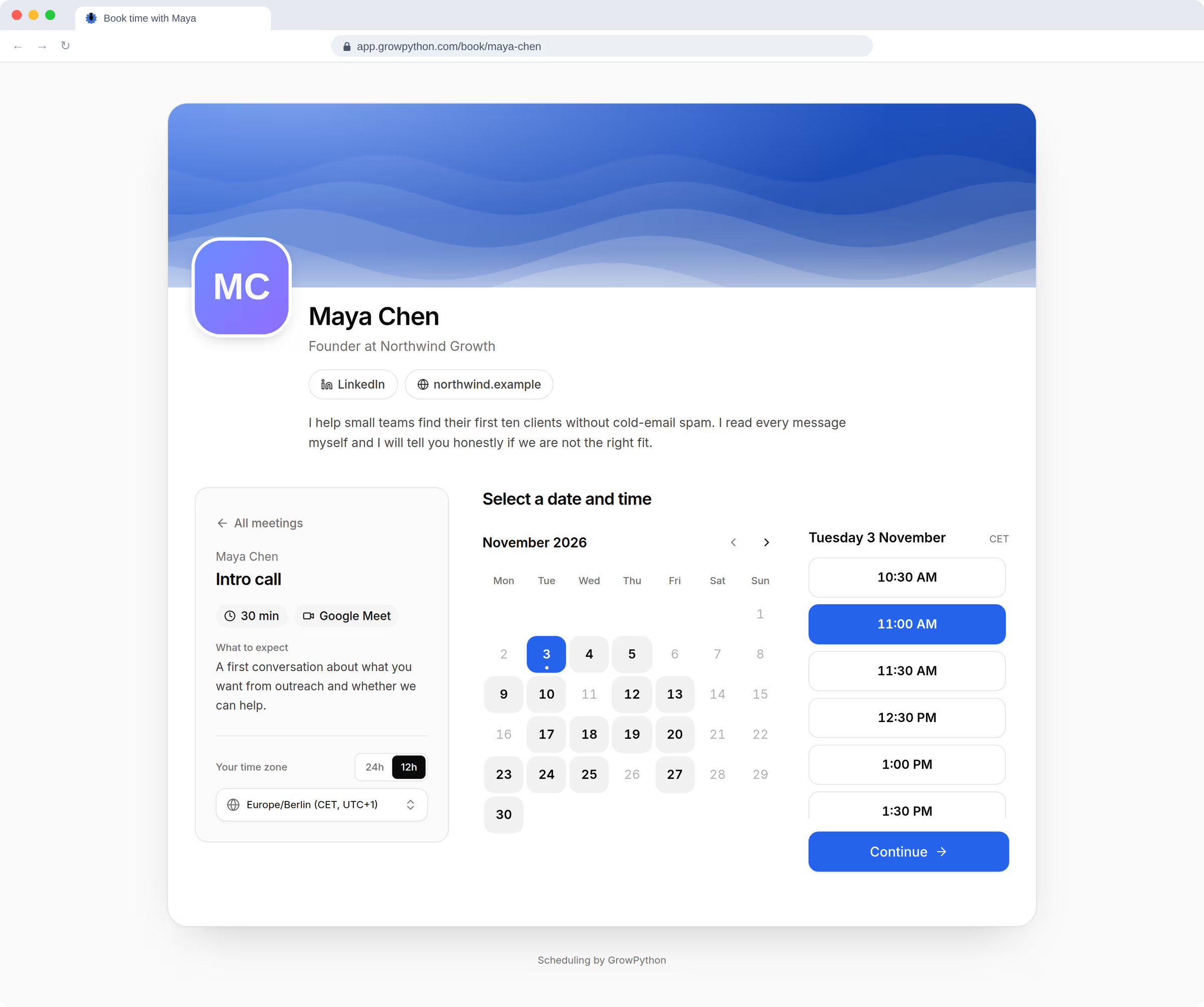
| Booking page | A public booking page with weekly hours and meeting types. Offer times in the Inbox adds free times and a booking link made for that person | A customizable booking page on the Free plan, with one event type; unlimited event types on Standard |
| Team scheduling | Each person edits their own booking page; owners and admins can edit anyone's | Round robin and team scheduling, lead routing from forms, centrally managed event types on Teams |
| Calendar connection | Meetings are saved in GrowPython (local mode). Google Calendar is coming, so other calendars are not checked for conflicts yet | One calendar on Free; multiple calendars on Standard |
| Notifications | The person booking sees a confirmation screen with a calendar file and a private link to change or cancel. GrowPython sends no confirmation or reminder email of its own yet | Meeting reminders, automations and a cancellation policy on Standard |
| Outreach and replies | LinkedIn, and email through a mailbox connected by SMTP and IMAP with an app password. Replies from both land in one Inbox | Scheduling outreach is listed on Standard; LinkedIn outreach is not stated |
| Meeting notes | Transcript, summary and proposed follow-ups from a recorded call, which a person approves | Notetaker is listed on the page; which plans include it is unclear on the page |
| Integrations | No integrations with other CRMs or automation tools are listed. The Inbox, calendar and CRM are built in | HubSpot and Mailchimp on Standard; Stripe and PayPal payments; Marketo, Pardot and Salesforce on Teams; Microsoft Dynamics on Enterprise |
| Free plan or trial | 5 days for new customers. Payment details are added to start it and the first charge comes after it ends | A free plan. A trial FAQ is on the page without terms |
Fair comparison
Where Calendly is the better choice
Calendly is a dedicated scheduler and its pricing page shows it: a free plan, several calendar connections, round robin and routing for teams, payments, reminders and CRM integrations including Salesforce. GrowPython's booking page is simpler and does not check your other calendars until its Google Calendar connection is on. If scheduling is the main need, start with Calendly's page.
Our strengths
Where GrowPython is the better choice
When someone answers on LinkedIn or by email, Offer times puts free times and a booking link made for that person into your message box. You press Send.
Lists, campaigns, the Inbox, the booking page, meeting notes and the CRM share one workspace and one record per person.
A meeting type can point to an external booking page, so GrowPython sends people to your link instead of offering times.
Using them together
Moving from Calendly, or keeping it
You do not have to switch at once. In GrowPython a meeting type can be marked as booked on an external page, so people are sent to your Calendly link while campaigns and the Inbox run in GrowPython. Move one meeting type at a time when you are ready.
The platform
The part of GrowPython to look at
See the real screens for what this page compares.
FAQ
Questions
- Can I keep using my Calendly link inside GrowPython?
- Yes. A meeting type can be marked as booked on an external page. GrowPython offers no times for it and sends people to your link.
- Does GrowPython send booking confirmation emails?
- Not of its own yet. The person booking sees a confirmation screen with the time, a calendar file and a private link to change or cancel. Email invitations from Google Calendar are coming with its connection.
- Does GrowPython connect to Google Calendar?
- The connection is being switched on and is not live yet. Until then GrowPython runs in local mode: meetings are saved in GrowPython only, and your other calendar is not checked.
- Which costs less?
- The published prices are for different things. Calendly lists $10 per seat a month (Standard, billed yearly) for scheduling. GrowPython is $25 per seat a month outside India and includes outreach, the Inbox and the workspace as well.
Sources
Where these facts come from
Prices and features change. Check the pages below for the latest. If something here is wrong, tell us at contact@growpython.com.
Ready to run client acquisition from one place?
Start your free trial, connect an account and build a small list first.
5-day free trial for new customers